
Bloxstrap Fonts – Use Minecraft or Other Fonts in Roblox
You might be amazed at how Roblox clients change their fonts and use the Minecraft font on Roblox… so, it’s strange! But yeah, it’s absolutely possible — Thanks to the Bloxstrap fonts feature, you can give the Roblox interface any look you like.
Well, we’ll guide you through a simple, beginner-friendly process to change your Roblox font using Bloxstrap — including how to find and install the famous Minecraft font or any other font you like.
Sorry, this feature is not available for mobile users
Steps to Install Minecraft or Custom Fonts in Roblox
- First, go to Bloxstrap, where you will need to download the Bloxstrap file.
- Then click the link to download the Minecraft font file. If you want a different font, just click the link to get it.
- After downloading Bloxstrap, install and open it, then go to the Mods menu.
- Scroll down to the Miscellaneous section.
- Look for the option “Apply Custom Font.” Click on “Choose Font.”
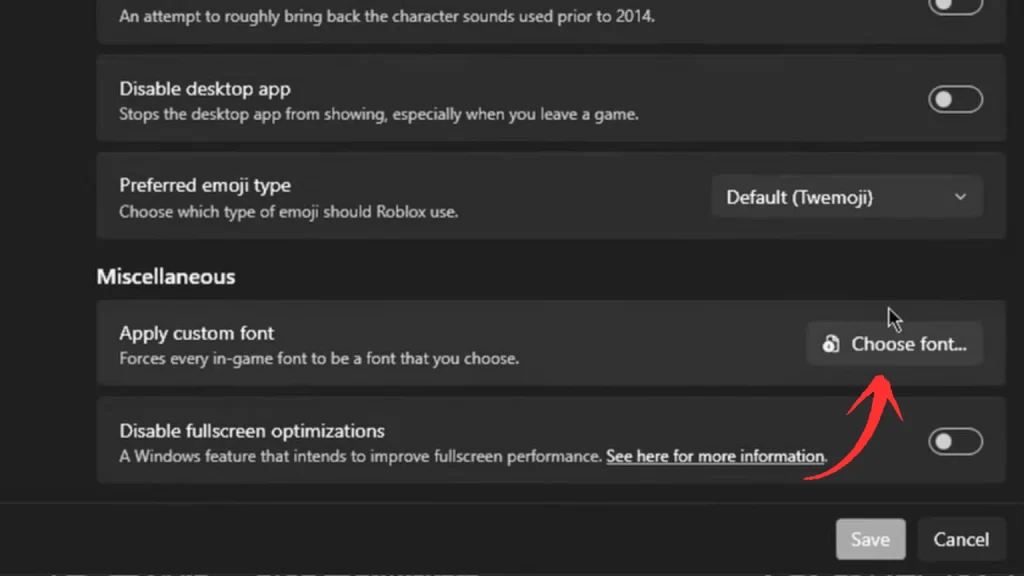
- After that, find the folder with the Minecraft font (or whatever you downloaded) and double-click the font.
- Then press Save at the bottom of the menu, open Roblox on Bloxstrap, and you will have the font. All right, cool.
How to Find Any Font You Like
Want to use a different font you saw somewhere but don’t know its name? Here’s a handy trick:
- Install a browser extension like WhatFont.
- Pin it to your toolbar and click the icon.
- Hover over the text you like — the font name will appear.
- Search for that font on Google and download it
- Repeat the same steps in Bloxstrap to apply the new font.
Conclusion
All of this is possible with Bloxstrap fonts. Bloxstrap’s Mods menu lets you apply any font you like to Roblox’s interface — a customization the official launcher does not offer. Enjoy features that aren’t available in Roblox by default — but are made possible with Bloxstrap. Whether it’s Fast Flags to boost FPS, smooth out gameplay, or access many other tweaks…
Frequently Asked Questions
Can I use the Minecraft font in Roblox?
Yes. Download the Minecraft font file, then in Bloxstrap go to the Mods menu, scroll to Miscellaneous, choose ‘Apply Custom Font’ → ‘Choose Font’, find the folder with the font and double-click it, then press Save and open Roblox on Bloxstrap.
Can I use any font in Roblox with Bloxstrap?
Yes. Bloxstrap’s Mods menu lets you apply any font you like to Roblox’s interface — a customization the official launcher does not offer. Just download your font and choose it the same way.
Does the Bloxstrap fonts feature work on mobile?
No. This feature is not available for mobile users.
How do I find the name of a font I saw somewhere?
Install a browser extension like WhatFont, pin it to your toolbar and click the icon, then hover over the text you like — the font name will appear. Search for that font on Google and download it, then apply it in Bloxstrap the same way.